

How to Choose an IT Support Company: 10 Questions to Ask Before Signing a Contract
An IT support company can provide fast response times, 24/7 coverage, and proactive service. The real difference is evident when a critical ticket is opened, a system goes down after hours, or an issue escalates from routine support to a larger technical problem.
Before you sign a contract, learn who owns urgent incidents, how escalation works, what’s included in your monthly agreement, and how the provider will work with your internal team. These details should be clear in the proposal, service model, and reporting process, not left to interpretation when the first problem arises.
At Arcadion, we believe the best IT support partnerships are built on clear accountability, practical processes, and measurable service expectations. This guide contains 10 questions to ask in vendor meetings, proposal reviews, and reference calls to help you select an IT support company based on evidence, not sales promises.
How do you choose an IT support company?
When choosing an IT support company, compare the support model, technician location, scope of service, coverage hours, communication channels, SLAs, escalation, security practices, onboarding, reporting, and contract terms. Ask each provider to describe real scenarios and then confirm that the written agreement reflects what was said.
Define the Support Model Before Comparing Providers
Some companies need a helpdesk to handle tickets for employees. Others need a co-managed partner for overflow, after-hours coverage, specialist escalation, or a defined platform. Others want a provider that will take responsibility for broader IT operations.
Outsourced IT support can take several forms:
- Helpdesk support: Employee tickets, user accounts, devices, access, and application troubleshooting.
- Co-managed support: Shared responsibility between internal IT and an external provider.
- Fully managed IT: Wider ownership across user support, infrastructure, security, suppliers, planning, and administration.
- Remote-first support: Centralized tools, remote assistance, device management, and support for distributed teams.
- Project support: Temporary help with migrations, rollouts, network changes, or specialized work.
Before you start IT support outsourcing, know your number of users, offices, remote workers, ticket volume, support hours, primary platforms, security needs, internal IT capacity, and on-site requirements. Without this information, proposals will be based on assumptions and will be impossible to compare fairly.
For a broader explanation of provider scope, read IT Support Services Explained: What Should a Business Expect From a Provider?. Organizations needing wider operational ownership can review fully managed IT services.
10 Questions to Ask an IT Support Company Before Signing a Contract
1. Where are your technicians located, and who will handle our tickets?
The technician model shapes the whole service experience. A provider may use an in-house team, subcontractors, offshore resources, or a mixed model. You need to know who can access your systems, communicate with employees, and take responsibility for an unresolved problem.
A credible answer: It identifies where technicians are based, what is handled internally, when work is escalated, and whether third parties are involved. It should also explain who owns the ticket during a handoff.
Ask next: Who is our service manager, and which teams can access our environment after hours?
2. What support hours and communication channels are included?
“24/7 support” can mean monitoring, emergency incident response, or a staffed helpdesk employees can contact at any time. Those are different commitments. Confirm whether users receive after-hours support, which issues qualify, and who decides what is urgent.
A credible answer: It separates business-hours support, after-hours coverage, monitoring, emergency escalation, and channels such as phone, chat, email, and portal.
Ask next: “If Microsoft 365 access fails at 7:00 p.m., who answers, who updates us, and what happens if the first technician cannot resolve it?”
3. What do your SLAs actually measure?
An SLA should define more than a fast acknowledgement. It should establish priority levels, first-response targets, escalation, restoration expectations, exceptions, and reporting. A fast first reply does not help if a ticket then sits without a clear owner.
A credible answer: It distinguishes response time, restoration of service, and final resolution. It explains when the SLA clock starts and stops and what happens when a third-party supplier is involved.
Ask next: Can we see the SLA language that will appear in our agreement and a redacted performance report?
4. How do Level 1, Level 2, and Level 3 escalations work?
The real test of a helpdesk is not how it handles password resets. It is what happens when an issue involves identity, networking, security, an application vendor, or several affected users.
A credible answer: Routine issues are routed quickly, specialists are brought in at defined points, and one person remains responsible for communication. Level 1 usually manages common user issues. Level 2 and Level 3 handle advanced configuration, infrastructure, security, and specialist work.
Ask next: Does the employee need to repeat the issue during a handoff, and how long can a ticket remain in the queue before a senior resource is involved? What Is an IT Help Desk? explains the tiered support model in more detail.
5. What is included in the helpdesk scope, and what is excluded?
This is where business IT services proposals can become misleading. Two providers may use the same service label but include very different levels of support. One may cover Microsoft 365 administration, endpoint troubleshooting, user access, remote access, onboarding, and standard applications. Another may charge separately for some of those requests.
A credible answer: It provides a service catalogue, examples of included work, exclusions, supported applications and devices, project boundaries, approval requirements, and any work that triggers additional charges.
Ask next: What are the three most common out-of-scope requests, and how are they approved and priced?
6. How do you support remote and hybrid employees?
Remote support is a core operating requirement. Your provider should be able to help users securely across locations, support remote onboarding, identify device issues, troubleshoot connectivity, and set clear limits around home-network problems.
A credible answer: It explains user verification, remote-session access, activity logging, device visibility, hardware replacement, and when an on-site visit is required. Microsoft’s Remote Help documentation is a useful reference point for organizations using Microsoft Intune.
Ask next: Are remote sessions role-based and logged, and can we review who accessed a device?
7. How do you onboard a new client and integrate with existing tools?
Many IT help desk outsourcing arrangements fail during transition. A capable provider still struggles when its technicians begin without accurate documentation, approved access, clear ownership, or knowledge of critical business applications.
A credible answer: It covers discovery, documentation, ticketing setup, remote monitoring and management integration, access approvals, SLA confirmation, phased go-live, internal communications, and early service reviews.
Ask next: Can we see the onboarding plan, task owners, and the documentation standard you will use before go-live?
Comparing providers? Review Arcadion’s Managed IT Helpdesk & End-User Support to see how centralized ticketing, Level 1 to Level 3 escalation, remote assistance, on-site dispatch, and support reporting are structured.
8. What reporting will we receive, and how will it lead to service improvement?
Ticket counts alone do not tell you whether service is improving. You need visibility into response performance, unresolved issues, recurring incidents, user experience, and actions taken to reduce repeat problems.
A credible answer: It includes recurring service reviews with ticket trends, SLA performance, outstanding issues, recurring causes, user satisfaction where available, and recommendations with owners.
Ask next: Can you show a recent example where reporting exposed a recurring problem and led to a process, system, or training improvement?
9. How do security controls show up in day-to-day support?
Helpdesk work affects security every day. Password resets, account requests, device replacement, MFA, access changes, patching, remote sessions, and offboarding all create risk when the process is weak.
A credible answer: It explains identity verification, access approvals, privileged access, MFA support, patching responsibilities, audit trails, remote-access controls, offboarding, and the process for escalating suspicious activity.
The Canadian Centre for Cyber Security identifies strong authentication, access control, secure device configuration, patching, and provider oversight as practical baseline controls. Its baseline cybersecurity controls for small and medium organizations can help frame this part of the discussion.
Ask next: What happens when a technician finds unusual account activity or a potentially compromised device?
10. Can you work with our internal IT team, and can you prove you are a fit?
A co-managed provider should reduce pressure on internal IT, not create a second support silo. It needs to work within agreed ownership boundaries, shared systems, escalation rules, and communication routines.
A credible answer: It defines responsibility for routine tickets, after-hours support, specialist escalation, project work, documentation, tools, reporting, and strategic planning. It also provides evidence of work with organizations of similar complexity, geographic footprint, regulatory needs, or internal IT structure.
Ask next: Can we speak with two comparable clients? Ask them what happened in the first 90 days and whether the provider kept its original commitments.
Documents to Request Before You Score Providers
Good providers should be comfortable providing evidence. Request these items before you compare finalists:
- A written service catalogue and list of exclusions
- The proposed SLA and a redacted performance report
- A sample onboarding plan with responsibilities and milestones
- An escalation map with named roles or team ownership
- Two client references comparable to your organization
- Contract terms covering renewals, price changes, termination, data access, documentation, and transition support
The final item is often ignored. Even an excellent provider should make it clear how the relationship ends, what information you receive, and how credentials, documentation, and assets transition to your next provider.
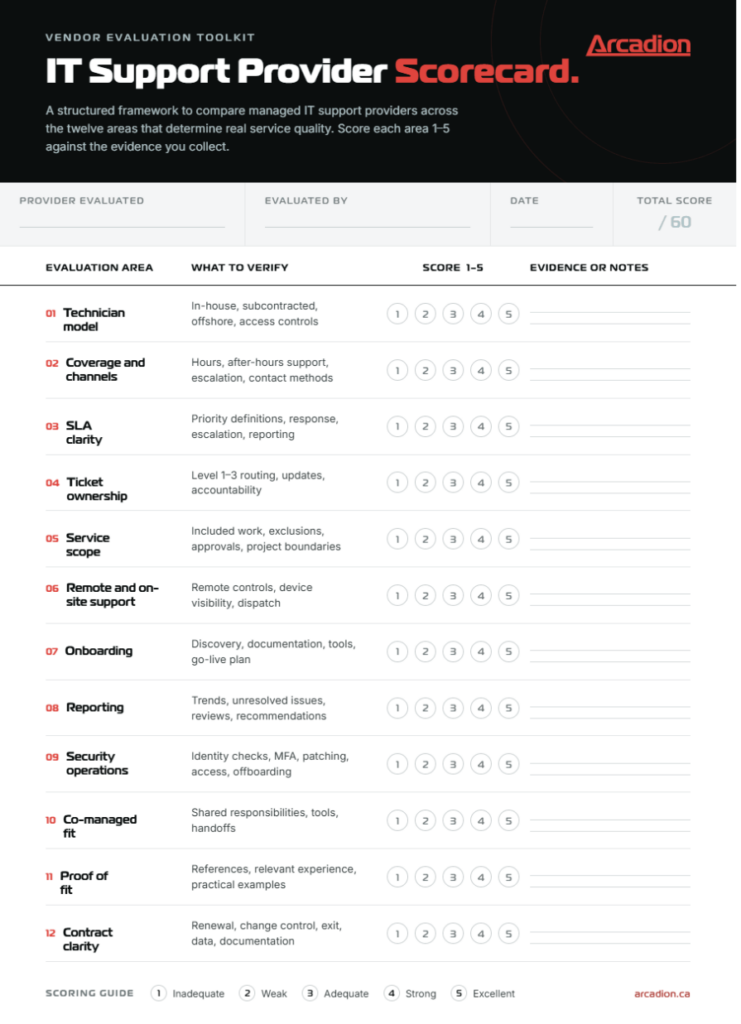
IT Support Company Comparison Scorecard
Score each provider from 1 to 5 after the call, proposal review, and reference checks. A score of 1 means the provider could not explain or document the item. A score of 3 means the answer was acceptable but incomplete. A score of 5 means the provider gave a clear process, written evidence, and examples that fit your environment.
Red Flags That Should Slow the Decision
A provider does not need to use the same model as every competitor. It does need to explain its model without evasive language. Take a moment to pause when a vendor is unable to convert a promise into a documented process.
Watch for:
- “24/7 support” that means alerts rather than live helpdesk coverage
- An unclear technician model or ticket owner
- SLAs that measure acknowledgement but not escalation or accountability
- No written scope, exclusions, or change approval process
- Onboarding that starts after you have committed
- Reports that list ticket counts but never identify recurring problems
- Security treated as a separate product instead of part of daily support
- No comparable client references
- Vague terms around price changes, termination, documentation, or transition support
Reach Out to Arcadion for Structured IT Support
Arcadion offers managed IT helpdesk and end-user support throughout North America, with 24/7 coverage, clear escalation procedures, secure remote support, user provisioning, onsite support when required, and monthly reporting. Its 100% North American team is in-house and can augment internal IT staff or act as a more complete help desk model for organizations that want more consistency.
When comparing IT support providers, look beyond the proposal and the monthly price. Select a partner that can detail how it deals with real tickets, escalations, access requests, recurring issues, and transition risk. Speak with Arcadion about a structured approach to IT support for your team.