

IT Help Desk Services in Ottawa: What Local Businesses Should Expect
How long should your employee have to wait for IT support when they can’t access their emails or connect to their laptop, or when a remote worker gets locked out before a call?
The answer for most businesses in Ottawa depends on the maturity of their IT support processes. Some teams still rely on scattered emails, quick messages, hallway requests, or an internal employee who gets pulled into every technical problem. This can still be fine for simple issues, but can start to become tricky to manage as the business grows, staff work from more locations, and daily operations also depend on cloud apps, secure access, and reliable devices.
Managed IT help desk services in Ottawa give businesses like yours a more consistent way to handle day-to-day technical problems:
- Employees know where to go.
- Tickets are tracked.
- Requests are prioritized.
- Recurring issues become easier to spot.
More complex problems are escalated instead of getting stuck in someone’s inbox.
Keep reading to uncover what businesses across Ottawa should expect from IT help desk support, what questions to ask before choosing a provider, and when to reach out to a managed IT services provider such as Arcadion.
What Are IT Help Desk Services?
Managed IT Helpdesk and End-User Support give you and your employees a central place to request technical support, resolve common IT issues, and escalate more complex problems. It typically covers issues such as login issues, software problems, device troubleshooting, access requests, ticket management, remote user support, and basic technical guidance.
That means that the helpdesk acts as your front line of IT support. Your employees reach out when an issue arises, whether that involves a password reset, Microsoft 365 access, a slow laptop, a printer problem, a VPN error, a Teams issue, or a software permission request.
A reputable and dependable helpdesk does more than answer support requests. It creates a process. Requests are logged, assigned, prioritized, resolved, documented, and reviewed.
For Ottawa businesses with hybrid teams, multiple offices, field staff, or internal IT teams under pressure, a managed helpdesk can reduce daily friction and give execs better visibility into operational slowdowns.
Why Ottawa Businesses Need More Than Basic Tech Support
Ottawa businesses often operate across multiple locations. You may have staff downtown, in Kanata, Nepean, Orléans, Gatineau, home offices, client sites, shared offices, etc. A support model that depends on one person being available at the right time can quickly become unreliable in these circumstances.
This is especially true for professional services firms, non-profits, associations, construction and field teams, healthcare-adjacent offices, local retailers, and government contractors who may not all have the same IT needs, but they share one problem: when employees cannot access the tools they need, operations slow down.
Common support issues include:
- A new employee is waiting too long for Microsoft 365 access
- A remote worker was locked out because of an MFA issue
- A project manager losing time to a slow laptop
- A team unable to access shared files before a deadline
- A field employee needing device or connectivity support outside the office
- An internal IT person spending hours on routine password resets instead of higher-value work
Basic tech support may patch things up, but it does not always create consistency. If support depends on informal messages, personal availability, or one-off troubleshooting, the business has little control over response time, documentation, escalation, or recurring problems.
This is where business IT support in Ottawa needs to move beyond reactive fixes. A professional helpdesk should help standardize how requests are received, prioritized, resolved, documented, and reviewed.
For Ottawa businesses that need a more consistent and reliable support experience, Arcadion’s managed IT helpdesk services in Ottawa can help centralize ticket handling, user support, troubleshooting, and escalation.
What Should Be Included in IT Help Desk Services in Ottawa?
A reliable helpdesk should simplify how employees get support and make IT issues easier for leadership to understand. The exact scope can vary by provider, but Ottawa businesses should expect several core functions:
| Helpdesk Function | What It Should Include | Why It Matters |
| Ticket Intake and Prioritization | A clear process for submitting, logging, assigning, updating, and reviewing support requests. Tickets should be prioritized based on business impact, urgency, and how many people are affected. | Prevents support from getting lost in random texts, hallway conversations, or scattered emails. It helps teams separate urgent business interruptions from lower-impact requests. |
| Remote Troubleshooting | Support for login issues, software errors, Microsoft 365 access problems, system performance, connectivity, application issues, and user guidance. | Helps hybrid and remote employees get support without needing an on-site visit for every issue. This reduces disruption and keeps employees productive across locations. |
| User Account and Access Support | Password resets, MFA support, new account setup, permission changes, software access, locked accounts, onboarding access, and offboarding access removal. | Access requests affect both productivity and security. A strong helpdesk helps employees get the access they need while following proper approval and verification steps. |
| Device and Endpoint Support | Troubleshooting for laptops, desktops, monitors, mobile devices, printers, docks, peripherals, operating systems, updates, and endpoint protection tools. | Device issues can slow down employees and expose larger problems, such as ageing hardware, endpoint conflicts, or poor device lifecycle planning. |
| Microsoft 365 and SaaS Support | Support for Outlook, Teams, SharePoint, OneDrive, mailbox issues, file sharing, licensing, permissions, and common SaaS access issues. | Many Ottawa businesses rely on cloud-based tools every day. Employees need a clear support path when access, permissions, or collaboration tools stop working. |
| Onboarding and Offboarding Support | Account creation, device setup, application access, permission assignment, license management, access removal, and device/account review when employees leave. | Strong onboarding helps new employees start work faster. Strong offboarding protects business data and reduces access-control gaps. |
| Escalation for Complex IT Issues | A clear process for moving issues from first-line support to senior technicians, network specialists, cybersecurity resources, cloud administrators, or infrastructure experts. | More complex problems should not get stuck with the wrong person. Escalation helps recurring or high-impact issues reach the right technical resource. |
| Documentation and Reporting | Ticket history, recurring issue tracking, response trends, resolution notes, ticket volume, common request types, and leadership reporting. | Reporting gives leadership visibility into support demand, recurring problems, user pain points, and areas that may need better IT planning. |
A good helpdesk does not just close tickets. It helps the business understand where support problems are coming from, which issues keep repeating, and where better systems, training, security controls, or infrastructure planning may be needed.
How to Evaluate IT Help Desk Services in Ottawa
Choosing a helpdesk provider should not only come down to response speed or price. The better question is whether the provider can support your users in a consistent, visible, and scalable way.
At a minimum, a professional provider should give you a clear support process, not vague promises. That includes a defined way to request help, a process for prioritizing tickets, a communication standard, an escalation path, and reporting that leadership can actually use.
Clear Ways to Request Support
Employees should know how to submit a request. That may include a portal, email, phone number, or approved support channel. The method matters less than the consistency. If employees keep bypassing the process, tickets are harder to track, and support becomes harder to manage.
Ticket Prioritization Based on Business Impact
Not every ticket deserves the same response. A business-wide outage, locked executive account, payroll system issue, or client-facing disruption should be treated differently from a low-priority software question.
A good provider should explain how tickets are prioritized and what happens when an issue becomes urgent.
Communication During the Support Process
Employees should not submit a ticket and hear nothing. A provider should give updates when an issue is received, assigned, delayed, escalated, or resolved.
This matters because silence creates frustration. Even when a fix takes time, clear communication helps employees understand what is happening.
Escalation Path for Bigger Problems
A provider should be able to explain what happens when first-line support cannot resolve an issue. Who reviews it next? How is the issue handed off? Does the ticket history travel with it? Can the provider bring in network, endpoint, cybersecurity, or cloud expertise when needed?
If escalation is unclear, complex issues can stall.
Reporting That Leadership Can Use
Business leaders do not need every technical detail, but they should be able to see useful patterns. A good helpdesk provider should be able to report on ticket volume, recurring issues, common request types, resolution trends, and areas that may need attention.
That reporting helps leadership move from reactive support to better IT planning.
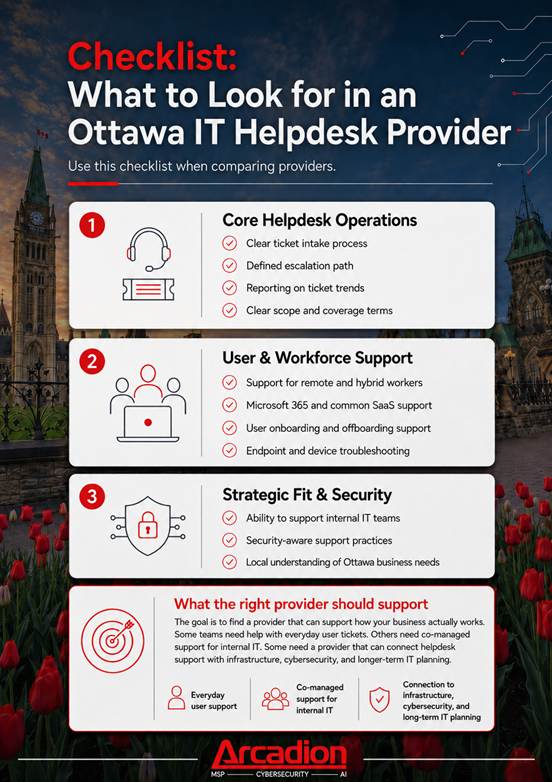
Checklist: What to Look for in an Ottawa IT Helpdesk Provider
Managed Helpdesk Support vs. Ad Hoc IT Support
Most businesses start with informal support because it feels simple. Someone on the team knows enough to fix common issues, or an external provider is called only when something breaks.
That break-fix can work for a time, but it often becomes harder to manage as support needs grow.
| Area | Ad Hoc IT Support | Managed IT Helpdesk |
| Request handling | Informal and inconsistent | Centralized ticket process |
| Response time | Depends on availability | Defined support process |
| Documentation | Often limited | Tracked and reported |
| Escalation | Unclear | Structured escalation path |
| User experience | Varies by issue | More consistent |
| Business visibility | Hard to measure | Easier to review trends |
| Support planning | Mostly reactive | Helps identify recurring needs |
| Internal IT workload | Often overloaded by routine issues | Routine tickets can be handled more efficiently |
| Onboarding and offboarding | Manual and inconsistent | Repeatable support workflows |
Ad hoc support is not always wrong. Smaller teams with occasional IT issues may not need a fully managed IT support model. But for more complex organizations with recurring tickets, remote workers, growing user counts, or overloaded internal IT staff, a managed IT helpdesk can create needed structure.
If your team has outgrown reactive troubleshooting solutions, Arcadion’s IT Helpdesk & End-User Support gives Ottawa businesses a clearer way to manage daily support requests, reduce internal pressure, and keep your employees productive.
Signs Your Business Has Outgrown Informal IT Support
A business does not need to be large before IT support becomes a problem. The warning signs often show up in small, repeated ways.
- Employees wait too long for help: Basic issues like password resets, software access, device problems, and connection issues take longer than they should.
- The same problems keep coming back: Recurring issues may mean tickets are being fixed one at a time, without tracking patterns or solving the root cause.
- Support depends on one person: If one employee is the default person for every IT issue, support can slow down when they are busy, unavailable, or focused on other work.
- Remote workers struggle to get support: Remote and hybrid employees may have trouble getting timely help with Microsoft 365, VPN access, devices, or collaboration tools.
- Onboarding and offboarding feel manual: New employees may not have the right access on day one, or departing employees may not be removed from systems quickly enough.
- Leaders cannot see what is happening: If there is no clear view of ticket volume, common issues, or response times, it becomes harder to improve IT support.
- Internal IT is stuck on routine requests: When skilled IT staff spend too much time on everyday fixes, they have less time for infrastructure, cybersecurity, automation, and larger projects.
A managed helpdesk can support internal IT by taking on routine requests, handling first-line support, and escalating only the issues that need deeper technical attention.
What May Not Be Included in Standard Helpdesk Support?
A good buyer guide should be clear about the scope. Helpdesk support is valuable, but it does not automatically mean every IT need is included in the same agreement.
Depending on the provider and service plan, standard help desk support may not include the following:
- Major infrastructure projects
- Full cybersecurity incident response
- Hardware replacement costs
- Large cloud migrations
- New office network builds
- After-hours support unless agreed in advance
- Complex application development or customization
- On-site support outside the agreed service area or coverage terms
This does not mean those needs cannot be supported. It means they should be clearly defined before work starts.
Businesses should ask what is included, what requires escalation, what may be billed separately, and how on-site IT support is handled. This protects both sides and helps avoid confusion when an issue appears urgent.
How IT Help Desk Services Support Security and Compliance
Helpdesk support and cybersecurity are closely connected. Employees often go to the helpdesk when they cannot access systems, need permission changes, have MFA problems, receive suspicious prompts, or run into endpoint security alerts.
A security-aware helpdesk can support the following:
- Access control
- Secure onboarding
- Secure offboarding
- Password resets
- MFA troubleshooting
- Device updates
- Endpoint protection coordination
- User guidance around approved systems
This does not mean every helpdesk ticket is a security incident. It means day-to-day support should follow processes that reduce risk instead of creating new gaps.
For example, offboarding should not depend on someone remembering to remove access days later. MFA troubleshooting should confirm the user properly before changes are made. Device issues should account for updates and endpoint protection. Access requests should follow approval rules.
For businesses that need stronger alignment between support and protection, helpdesk services should connect naturally with broader cybersecurity, endpoint management, and managed IT operations.
When Does a Managed IT Helpdesk Make Sense?
A managed IT helpdesk is likely worth considering if your team is losing time to recurring IT issues, employees do not know where to go for support, or your internal IT person is overloaded.
It can make sense if remote staff are not getting consistent help, leadership wants ticket visibility, or the business needs helpdesk support connected to broader managed IT and cybersecurity needs. For teams at this stage, Arcadion’s IT help desk services in Ottawa can provide a more structured path for ticket intake, end-user support, and issue escalation.
For smaller organizations, a lighter model may be enough. If your team is very small, issues are rare, and you already have responsive internal support, occasional project-based support may be suitable.
This is why the decision should be based on business impact, not company size alone. The real question you want to be able to answer is whether IT support is helping employees stay productive or pulling time away from the work they need to do.
Helpdesk Support, Managed IT Services, and Co-Managed IT: What Is the Difference?
| IT Support Model | What It Means | Common Examples | Best Fit |
| Helpdesk & End-User Support | Day-to-day support for employees and end users. | Tickets, troubleshooting, password resets, access requests, device support, Microsoft 365 support, and basic technical help. | Businesses that need a clear process for handling everyday IT issues. |
| Fully Managed IT Services | Broader management of the company’s IT environment. | Infrastructure management, endpoint management, cybersecurity, backups, cloud systems, monitoring, vendor coordination, and IT planning. | Businesses that want an external partner to manage larger parts of their IT operations. |
| Co-Managed IT Support | External IT support that works alongside an internal IT team. | Routine ticket handling, user support, escalation support, after-hours coverage, or support for specific technical areas. | Businesses with internal IT staff who need extra capacity, coverage, or specialized support. |
Future Helpdesk Support Trends Ottawa Businesses Should Watch
Helpdesk support is becoming more connected to the rest of IT operations. Ottawa businesses should expect more support requests tied to identity, MFA, Microsoft 365, cloud applications, endpoint management, and remote access.
AI-enabled support routing and ticket summarization are likely to play a bigger role. These tools can help classify requests, summarize ticket history, and route issues to the right support path faster. The value comes from using AI to improve the support process without removing the need for real technical judgment.
Helpdesk data will become more useful for planning as well. Ticket trends can help businesses identify where employees need training, which systems create recurring problems, and where infrastructure or security changes may be needed.
The helpdesk should no longer be viewed as a basic support channel. For growing teams, it can become one of the clearest signals of where IT operations need attention.
Build a More Reliable IT Support Experience for Your Ottawa Team
Arcadion helps Ottawa businesses create a more structured way to manage everyday IT support. Through its IT Helpdesk & End-User Support service, Arcadion supports ticket handling, troubleshooting, onboarding, device issues, escalation, and support visibility.
This is useful for businesses that have outgrown informal troubleshooting or internal IT teams that need help with routine requests. A managed helpdesk gives employees a clear place to go for support and helps issues get tracked, prioritized, and escalated properly.
It can also reveal bigger IT problems. Repeated access issues, device problems, connectivity concerns, or MFA tickets may point to gaps in identity management, endpoint support, infrastructure, or security.
Arcadion helps connect everyday support with broader IT operations, so Ottawa businesses can reduce repeat issues, improve response times, and give employees a more reliable support experience.
If your team needs clearer, more consistent IT support, get in touch with Arcadion’s IT specialists in Ottawa.
SEO Metadata
Meta Title:
IT Help Desk Services Ottawa: What to Expect
Meta Description:
Learn what Ottawa businesses should expect from IT help desk services, including ticket support, remote troubleshooting, escalation, and reporting.
Recommended Slug:
/news-and-insights/posts/it-help-desk-services-ottawa